SafeFanControl is free to download. Monitor mode is free forever. Fan control features are unlocked with a one-time license.
System Requirements
| Requirement | Details |
|---|---|
| macOS | 15 (Sequoia) or later |
| Mac hardware | Apple Silicon (M1, M2, M3, M4, M5) or Intel Mac with T2 chip |
| Permissions | One admin password prompt to install the background helper daemon |
| Disk space | ~5 MB |
Download
Version 1.0 · macOS 15+ · Universal Binary (Apple Silicon + Intel)
Not on the Mac App Store. SafeFanControl installs a privileged background daemon, which is incompatible with the App Store sandbox. Distribution is direct — no developer profile required for personal use.
Installation
- Open the downloaded
.dmgand drag SafeFanControl to your Applications folder. - Launch the app. On first run, an admin dialog installs the background helper and watchdog daemons.
- Done. launch the app and let the Fan Test Wizard and Helpers Installer guide you through.
macOS may show a Gatekeeper prompt on first launch since the app is not App Store distributed. Right-click → Open to proceed.
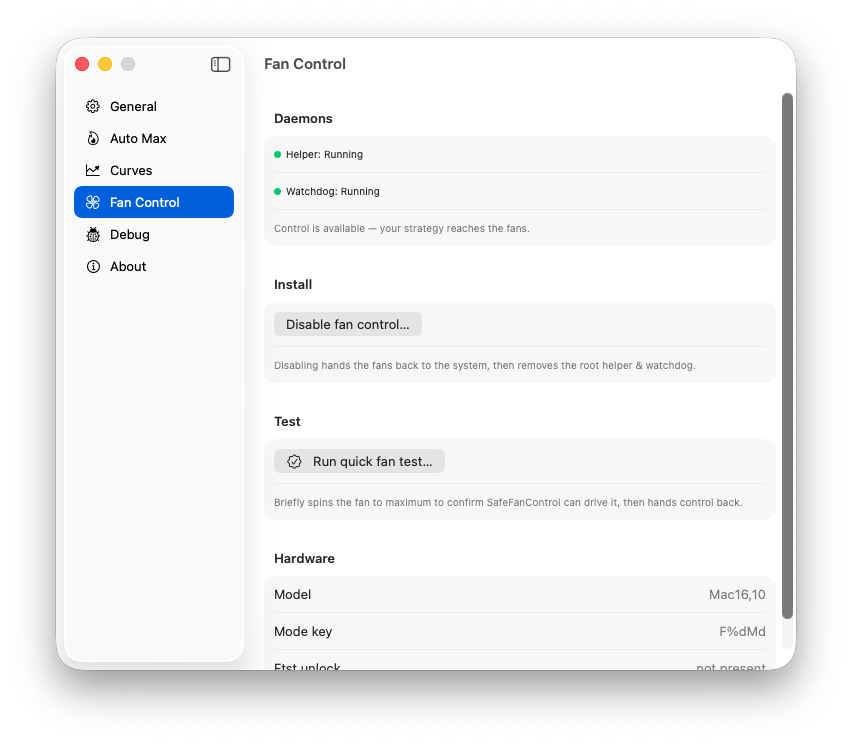
Fan Control settings — daemon status, quick fan test, and hardware details
Uninstall
SafeFanControl includes a complete uninstall flow in Settings → Uninstall. It removes the helper daemon, watchdog daemon, and all associated files in one step.
Privacy
SafeFanControl does not collect telemetry, analytics, or crash reports. Your hardware data stays on your device. See the Terms of Service & Privacy Policy for full details.